Free tool
AI Summarizer
Paste articles, essays, lecture notes, or research papers and get clear AI summaries instantly. Try free in your browser or get the full Android app with PDF and image support.
Free AI Summarizer →12+ authentic AI tools
Read less. Understand more. Create faster with Briefix. Summarize, scan OCR, solve homework, build an ATS resume, and create a Raast PK IBAN QR - all free, no signup. Try the browser demo or get Android on Google Play.
Popular: AI Summarizer · OCR Scanner · Homework · Raast QR · ATS Resume · YouTube
12+
Free AI tools
24+
Languages
4.9
Play rating
Free
Forever
On Android
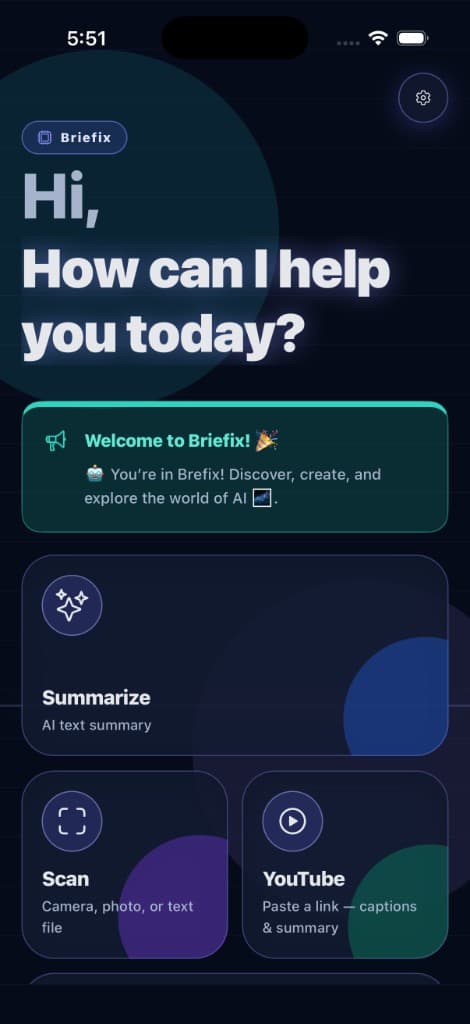
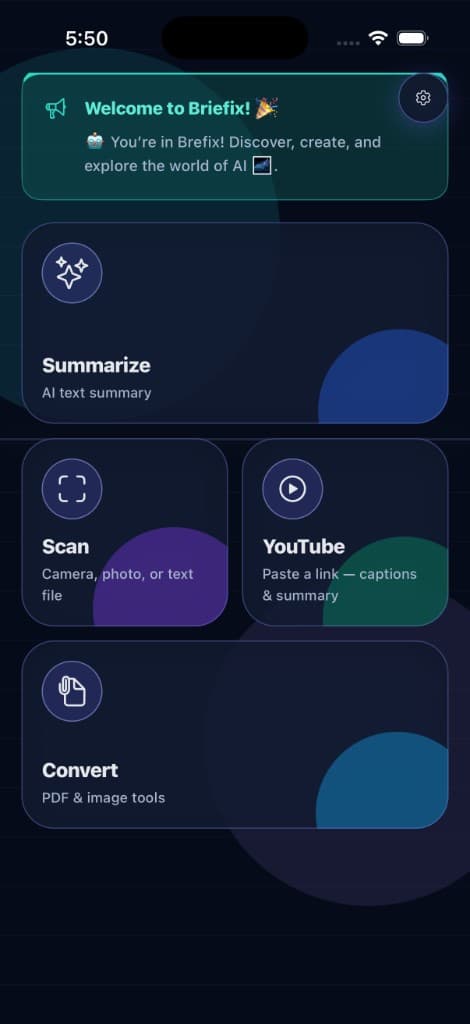
This website is the hub. The product is a free Android app. Search, summarize, scan homework, build an ATS resume, and generate a Raast PK IBAN QR from the same home screen - no extra apps, no signup.
Guide
Briefix is a free all-in-one AI productivity app. Instead of a chat window plus a scanner plus a PDF site, you import content once - paste, camera, PDF, or a YouTube link - and pick the tool: summarize, explain, solve homework, map, rewrite, or generate a QR.
The Android app includes OCR, mind maps, Job Resume Coach, Raast P2P QR, barcodes, and YouTube captions. The browser demo on this site lets you try the AI summarizer with no account. Every feature stays free; optional premium only removes ads.
Σ
summarize
Condense any article
◎
scan
OCR image to text
✓
solve
Homework step-by-step
⌘
map
Mind map from notes
QR
raast
PK IBAN payment QR
♫
listen
Text to speech
Free AI Tools · Try it now
This is one of Briefix's free AI productivity tools. Paste any article, lecture notes, research paper, or homework text - the AI condenses it into clear, shorter text in seconds. No account required. Every feature in the app is free to use. Optional premium removes ads. After summarizing, hit Humanize to rewrite in natural language, then listen with text-to-speech at any voice and speed you choose. Your text is sent once for summarization and never stored. Why I replaced six apps with one free AI tool (Medium).
Input needs at least 8 words and at most 4,000 characters.
Summary
Your summary will appear here.
Top picks
Free tool
Paste articles, essays, lecture notes, or research papers and get clear AI summaries instantly. Try free in your browser or get the full Android app with PDF and image support.
Free AI Summarizer →Free tool
Scan, upload, or paste homework questions and get teacher-style, step-by-step solutions instantly. Solve multiple questions at once and save as PDF - completely free on Android.
Free Homework Solver →Free tool
Turn photos, screenshots, handwritten notes, receipts, and scanned documents into editable text. Then summarize or rewrite in the same workflow - free on Android.
Free OCR Scanner →Free tool
Merge multiple PDFs, split pages, convert PDF to images, turn photos into PDF, and more - all free inside Briefix. No watermarks, no upload limits, no account needed.
Free PDF Tools →Free tool
When a YouTube video has captions, Briefix extracts them and generates skimmable key points - perfect for lectures, tutorials, and long interviews. Free on Android.
Free YouTube Summarizer →Free tool
Your personal AI tutor for any subject. Open Teach mode for structured lessons, teacher-style explanations, and quick quizzes - free on Android in 24+ languages.
Free AI Tutor →Free tool
Yes, Briefix Resume Coach is free - full ATS score, keyword gaps, section feedback, and cover letter with no subscription. Upload your resume and the job posting, then create an ATS-ready version using only what you've actually done.
Free Job Resume Coach →Free tool
Generate an interactive mind map from any Briefix summary. Pinch, pan, expand or collapse branches, and export the map with your summary as PDF - in all 24 app languages, completely free.
Free Mind Maps →Free tool
Generate QR codes for Text, Website, Email, Phone, SMS, Wi‑Fi, and Bank / Wallet payments including Pakistan Raast P2P. Style with templates, colors, a center logo, and captions, then save or share - free on Android.
Free QR Code Generator →Free tool
Create barcodes for retail, inventory, shipping, and industrial labels. Briefix supports 11 formats with smart validation, templates, colors, and one-tap save or share - free on Android.
Free Barcode Generator →Free tool
Paste an email, essay, caption, or cover letter and see readability, mood, tone, writing density, and voice type. Then rewrite in a different style or share an AI energy card - free on Android.
Free Text Energy Scanner →Free tool
Need to check my homework before you submit? Upload your work and get marks, corrections, and a clear breakdown of where you went wrong. Briefix Mistake Finder is your free AI homework checker on Android - then open Homework Solver or AI Tutor if you still need the method.
Free AI Homework Checker →Start with the same topics people search most often for free AI productivity tools.
Platform overview
Everything in one place: AI summarizer, OCR, homework solver, mind maps, Raast QR, barcodes, ATS resume coach, YouTube captions, PDF tools, and learning resources. Every tool below is free. Optional premium only removes ads.
Instantly summarize articles, PDFs, notes, research papers, websites, and documents. Generate clear AI explanations from text, images, article links, and PDFs to simplify difficult topics into easy-to-understand insights.
Open AI Summarizer →Turn any summary into an interactive mind map with pinch, pan, and expand/collapse controls. View a mind map instantly from any summary, export mind maps with summaries as PDF, and use them in all 24 app languages.
Open Mind Maps →Select text in any app - Notes, Messages, Chrome, and more - choose Briefix from the text menu, and get an AI rewrite in a quick sheet without opening the full app. Pick Humanize or Energy styles, adjust mood, density, and voice, then copy with one tap.
Create QR codes for Text, Website, Email, Phone, SMS, Wi‑Fi, and Bank / Wallet payments - including Pakistan Raast P2P for PK IBAN. Style with Briefix, Classic, Brand, or Dark templates, custom colors, optional caption, and a center logo with live preview. Save, share, or copy encoded data.
Open QR Code Generator →Generate 11 formats for retail, inventory, shipping, and industrial labels: Code 128, Code 39, Code 93, EAN‑13, EAN‑8, UPC‑A, UPC‑E, ITF‑14, Codabar, Data Matrix, and Aztec. Smart validation with auto check digits, templates, custom colors, captions, and a human-readable value toggle under 1D barcodes.
Open Barcode Generator →Daily AI weather briefings at the time you choose, live temperature, rain, and heat warnings, smarter notifications that arrive on time after restarts, night-aware moon icons, an improved forecast dashboard, and weather alerts in all 24 app languages.
Scan, upload, or paste homework questions and get step-by-step solutions instantly. Solve multiple questions at once, save solutions as PDF, and study in 24+ languages.
Open Homework Solver →Your personal AI tutor for any subject. Teach mode delivers structured lessons, teacher-style explanations, and quick quizzes. Study smarter with guided help in 24+ languages.
Open AI Tutor →Create an ATS-ready resume for any job posting. Upload your resume and job description to get job-fit analysis, ATS score, keyword gaps, section feedback, quick wins, and red flags - then a tailored ATS resume and cover letter using only your real experience. Compare, export PDFs, and keep history on device.
Open Job Resume Coach →Upload your work and instantly spot mistakes with marks, corrections, and clear breakdowns so you can improve faster and avoid repeating errors.
Open Mistake Finder →Analyze your writing with AI-powered text analysis: readability score, mood, tone, writing density, and voice type - instantly. Rewrite with different styles, moods, and tones. Save scans in Energy History and share beautiful AI energy cards.
Open Text Energy Scanner →Rewrite AI-generated content to sound more natural, professional, human-like, casual, smart, or engaging. Improve emails, captions, essays, notes, blogs, and social media content with advanced AI writing tools.
Extract text from images, screenshots, scanned files, handwritten notes, receipts, and documents with high-accuracy OCR technology - then summarize or rewrite it in the same workflow.
Open OCR Scanner →Merge PDFs, split PDFs, manage PDF files, and convert videos into high-quality PDF documents with link support. Use speech-to-text and text-to-speech to convert audio into text or text into realistic speech.
Open PDF Tools →One scanner for QR codes and barcodes - camera or gallery - with a Create shortcut into the matching generator. Smart next actions: open links, call, email, connect Wi‑Fi, and more, plus safety checks.
Text-to-speech with word-by-word highlight. Pick your preferred voice, adjust speed and pitch, and follow along as you listen - perfect for study notes, summaries, and homework explanations.
When a video has captions, turn a lecture or tutorial into skimmable key points and meeting-ready notes before you dive in - free, built into the same app.
Open YouTube Summarizer →One tap after summarization rewrites the AI output into warm, conversational prose - no robotic phrasing. Perfect for sharing with classmates, colleagues, or posting on social media.
Learn

Resume · October 1, 2026 · 8 min read
Most resume coaches say “free,” then lock the report. Briefix is different: Job Resume Coach and every other tool are free - no subscription, no feature paywall.

Raast QR · September 28, 2026 · 8 min read
Create a free Raast P2P QR code from your Pakistani IBAN. Instant payments, no typing errors, no generator fee - a complete 2026 guide.

Students · September 28, 2026 · 9 min read
You do not need ten subscriptions. Here are the ten AI workflows students actually use in 2026, and how to run all of them free in one Android app.

Resume · September 28, 2026 · 8 min read
Applicant tracking systems skim keywords and layout. Here is how to build an ATS-ready resume for a specific job posting without paying for a resume builder.

OCR · September 28, 2026 · 7 min read
Most “free” OCR apps stop at a text box. We compared what students actually need in 2026: accuracy, handwriting, privacy, and a path from scan to summary.

YouTube · September 28, 2026 · 6 min read
You do not need to watch 45 minutes to know if a lecture is useful. If the video has captions, Briefix can turn it into key points in the same free app.
Alternatives
Honest side-by-side pages for students searching free alternatives - QuillBot, Grammarly, Photomath, CamScanner, and ChatGPT.
FAQs
Quick answers about Briefix - the free all-in-one AI productivity app.
Yes. Every feature in Briefix is free to use - AI Summarizer, Homework Solver, OCR, PDF tools, QR scanner, and all other tools are included at no cost on Google Play and in the browser demo. The free app may show ads. An optional premium plan removes ads and unlocks a smoother experience for $0.49/month, $3.99/year, or $14.99 lifetime (one-time).
Yes. Briefix offers optional premium plans to remove all ads and enjoy a faster, smoother app experience. Monthly is $0.49, yearly is $3.99, and Lifetime Access is $14.99 one-time - all billed through Google Play. All AI tools remain free whether or not you subscribe.
Briefix is a free all-in-one AI productivity app powered by advanced AI tools for summarizing, explaining, rewriting, scanning, OCR, PDF management, QR and barcode create and scan, homework solving, and text analysis. Instead of using multiple apps, Briefix gives you everything in one fast, lightweight platform.
Briefix includes AI Summarizer, Mind Maps, AI Explainer, AI Homework Solver, AI Tutor with Teach mode, Job Resume Coach, Mistake Finder, AI Text Energy Scanner, AI Rewrite & Humanizer, OCR Scanner, PDF Tools (merge, split, convert), QR Code Generator, Barcode Generator, QR & Barcode Scanner, Speech to Text, Text to Speech, and YouTube summarizer - all free to use.
Yes. Briefix includes a QR Code Generator for Text, Website, Email, Phone, SMS, Wi‑Fi, and Bank / Wallet payments - including Pakistan Raast P2P for PK IBAN - plus a Barcode Generator with 11 formats (Code 128, Code 39, Code 93, EAN‑13, EAN‑8, UPC‑A, UPC‑E, ITF‑14, Codabar, Data Matrix, Aztec). Style with templates, colors, captions, and logos, then save, share, or copy. The QR & Barcode Scanner also has a Create shortcut into the matching generator.
Yes. Briefix includes a free AI Summarizer that works in your browser with no sign-up. Paste any article, essay, or notes, choose Short, Medium, or Long length, and get an instant summary. The full Android app also summarizes PDFs, images, and links, and can turn summaries into interactive mind maps with PDF export.
Yes. In the Android app, you can instantly generate an interactive mind map from any summary. Pinch, pan, and expand or collapse branches, export the mind map with the summary as a PDF, and use Mind Maps in all 24 supported app languages - completely free.
Yes. The AI Homework Solver lets you scan, upload, or paste questions and get step-by-step solutions instantly. Solve multiple questions at once, save as PDF, and study in 24+ languages - completely free on Android.
Yes. Briefix includes a free AI Tutor with Teach mode - structured lessons, teacher-style explanations, and quick quizzes for any subject. Study smarter with guided tutoring in 24+ languages - completely free.
Yes. Job Resume Coach is free in the Briefix Android app. Create an ATS-ready resume for any job posting - then get ATS score, keyword gaps, section feedback, and a cover letter grounded in your real experience only. Results stay in on-device history.
Mistake Finder lets you upload your work and instantly spot errors with marks, corrections, and clear breakdowns. See exactly where you went wrong, learn from the feedback, and avoid repeating the same mistakes - all free in the Android app.
Yes. When a YouTube video has captions available, Briefix extracts them and generates a free AI summary of key points - useful for lectures, tutorials, and long interviews.
Yes. The OCR Scanner extracts text from images, screenshots, handwritten notes, receipts, and scanned documents. You can then summarize or rewrite the extracted text in the same workflow - all free in the Android app.
Briefix includes free PDF merge, PDF split, PDF to images, images to PDF, video to PDF conversion, and PDF management tools. Speech-to-text and text-to-speech are also built in.
Yes. Briefix includes an AI Humanizer and Rewrite tool that makes AI-generated text sound natural and conversational. Try it free in the browser demo after summarizing, or use the full rewrite styles in the Android app.
The full app is currently available on Android via Google Play with every feature free. The browser demo on this page works on any device including iPhone, iPad, Mac, and PC - no download needed. An iOS app and a fuller web version are on the roadmap.
Share for free
One tap to share the free AI summarizer, OCR scanner, homework solver, and Raast QR generator.
Premium plans
Every AI tool stays free - including AI Summarizer, Homework Solver, OCR, and PDF tools. Upgrade anytime for a completely ad-free experience and a faster, smoother app.
Monthly Plan
$0.49/ month
Yearly Plan
$3.99/ year
Save vs paying monthly
Lifetime Access
$14.99/ once
One-time purchase · forever ad-free
Premium benefits
Plans are billed through Google Play. Subscriptions cancel anytime in your Play Store account settings. Lifetime Access is a one-time purchase. See our Terms and Privacy Policy. Full pricing page →
Free AI Productivity App - Available now on Android
On Android? Search Briefix on Google Play and install for free - AI Summarizer, Homework Solver, AI Tutor with Teach mode, Job Resume Coach, Mistake Finder, OCR, PDF tools, QR & barcode generators, scanner, text rewriting, and every other feature is free to use. Go ad-free with premium from $0.49/month or $14.99 lifetime. iOS and a full browser experience are coming next.